
Updated November 15, 2026 · Last checked November 15, 2026 against Kling's 4.0 User Guide.
Short answer: Start a Kling 4.0 prompt with one clear sentence about the subject, scene, action and emotion. Then add only what changes the result: camera work, timing, audio and what must stay the same. For a clip with several beats, split the prompt into time ranges, such as 0–5 seconds, 5–10 seconds and 10 seconds to the end.
What structure should a Kling 4.0 prompt follow?
Kling's User Guide gives a four-part structure:
| Part | What to write |
|---|---|
| Asset roles | What each uploaded image or video defines, and what to keep from it |
| Overall settings | Scene and texture, visual style, camera tone |
| Sequence of events | What happens in each time range |
| Audio | Dialogue or voiceover, ambient sound, music, sound effects |
You do not need every part for every shot. Keep the subject and its action close together, and use concrete verbs such as "turns", "walks", "opens" or "tilts". Add light and texture once the viewer can tell what the scene is doing.
How do you write a prompt by time range?
Kling 4.0 makes 3 to 30 seconds in one generation, and multi-shot is on by default, so the model can split a clip into shots on its own. To control the order, write the events in time ranges. Kling's guide uses this pattern:
0–X s: visuals + action + emotion
X–Y s: camera movement + additional details
Y s–end: closing shot
A 15-second example:
0–5 s: A barista in a small corner café pours milk into a cup. Calm and focused. Medium shot, warm morning light.
5–10 s: The camera slowly pushes in to a close-up of the cup as a leaf pattern forms in the foam.
10 s–end: She slides the cup across the counter and smiles. Hold on the cup in the foreground.
Match the ranges to the duration you set; the full range is explained in our Kling 4.0 video length guide. If a moment must look exactly like an image you have, pin it with Kling 4.0 keyframes instead of describing it. For the camera part of each range, see Kling 4.0 camera moves.
Kling 4.0 prompt for product shots
Separate product stability from changes in viewpoint, and check the label and shape in every result. The prompt guides the result; it does not guarantee it.
A clear glass perfume bottle on a moss-covered rock in a quiet forest. The camera makes one slow clockwise orbit. Morning light catches the glass, and a few droplets roll down its surface. The bottle stays centered and its shape stays unchanged. Natural colors, realistic textures, one continuous shot.
Kling 4.0 prompt for portraits
Begin with one change in expression, a clear head movement and a steady camera.
A woman beside a window turns toward a friend, pauses, then smiles softly. Use a steady medium close-up, natural skin texture and soft afternoon light. Her shoulders move subtly with her breath. Keep the background still and avoid sudden camera movement.
Kling 4.0 prompt for action scenes
Establish positions in a wide shot before the camera moves closer. Do not combine an orbit, a rapid zoom and several cuts in the first test.
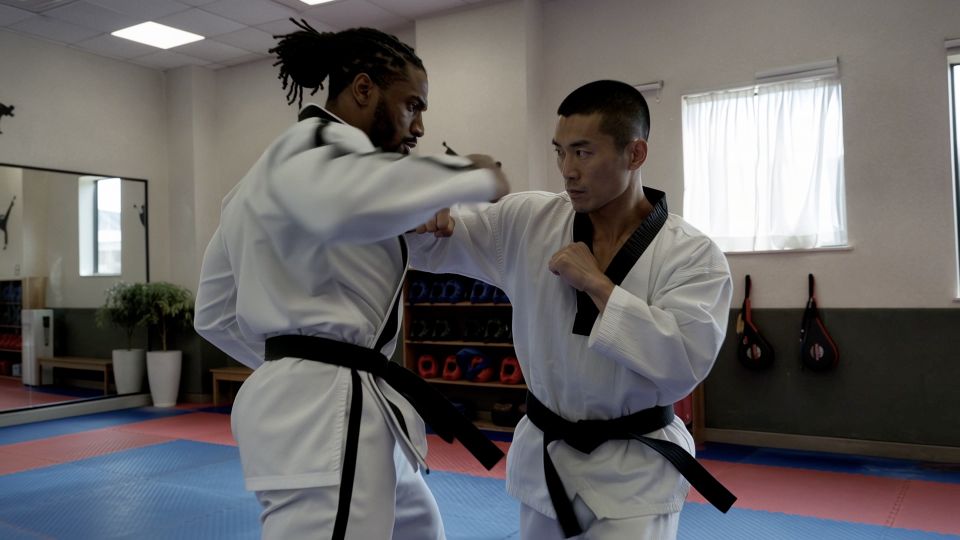
Two martial artists exchange one controlled sequence in a sunlit training hall. Start in a wide shot, then move the camera slowly closer while keeping both people in frame. Clear body movement, grounded footwork, natural light. One continuous shot without cuts.
How do you write prompts for image references?
Tell the model what each image defines and what to keep from it. Kling's guide warns that if you list asset IDs without roles, the model guesses their use and results become less predictable. For example:
@Image1 defines the scene. Preserve its spatial layout, furnishings and lighting. @Image2 defines the female protagonist. Preserve her facial features, hairstyle and clothing. The female protagonist walks toward the window, stops and looks back.
Do not ask for movement that conflicts with the starting image. A tightly cropped portrait has little room for a full-body action. For more on roles, see Kling 4.0 Omni Reference.
How do you revise a result?
| Problem | A useful revision |
|---|---|
| Too many things happen | Reduce the scene to one main action, then add a second beat only if needed. |
| Beats happen in the wrong order | Rewrite the events as time ranges. |
| The camera changes unexpectedly | Specify one continuous shot and one simple movement. |
| The look is vague | Replace abstract words such as "premium look" or "cinematic feel" with concrete lighting, materials and composition. |
| A product changes shape | Use a clearer reference, reduce motion and state that the product's geometry must stay unchanged. |
| A character looks different | State each reference's role and check turns and occlusions. |
| Dialogue feels wrong | Separate the speaker, the exact line and the background sound; review the audio after generation. |
Change one detail at a time and compare the results.
FAQ
How long should a Kling 4.0 prompt be?
The limit is 8,000 tokens, but longer is not better. Kling recommends one sentence that describes the subject, scene, action and emotion, then only the details that affect the result.
Should an image-to-video prompt describe the whole image?
No. The image already carries the visual information. Describe the change you want and the details that must stay the same.
What should I change when the camera moves the wrong way?
Separate the camera instruction from the subject's action. Use one main movement in the first test, state the framing, and describe where the movement ends.
Can a prompt guarantee an accurate product label?
No. State the appearance you want, use a clear reference, and check the result. Prompts guide the model; they do not guarantee lettering.
Can I upload music for the prompt to use?
No. Audio input supports voice profiles only. Kling generates music and sound effects from the visuals, so describe them in the audio part of the prompt.
Where do these facts come from?
- Kling 4.0 User Guide, Kling AI. Prompt structure, time-range format, asset roles, prompt length, audio input and revision tips.
- Text-to-video prompt guide, Kling AI. Subject, movement and scene as the core of a prompt.
- Image-to-video guide, Kling AI. Simple motion wording that fits the reference image.
All facts were checked on November 15, 2026. The example prompts are illustrations, not measured results.
Try Kling AI Today
Write your prompt in time ranges, then generate a Kling 4.0 video in your browser.